
Android app
SysGadh on your phone
The same SysGadh your office uses, in an app made for the workshop and the site. Log in with your own account and see only the menus your work needs.
Version 1.1 54 MB Android 7.0 or later Updated 24 Oct 2026
- Check in with photo and location
- Same login as the browser
- PDFs open on the phone
In the app
Made for work away from the desk
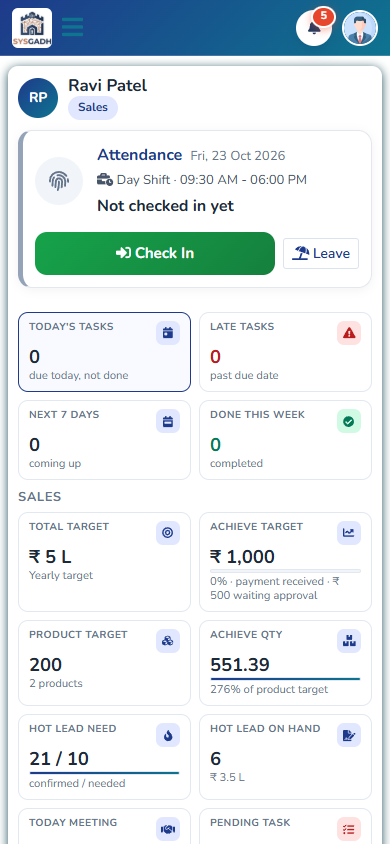
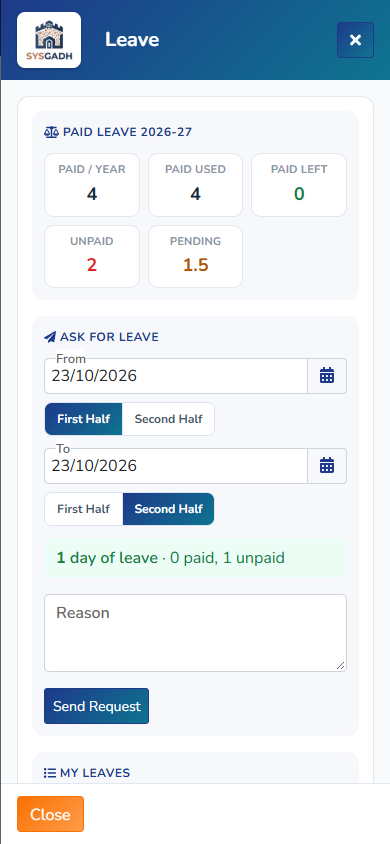
Attendance and leave
Check in and check out with a live photo and your location, at your office or godown, or at a work site. Ask for leave and see the reply.
Your work list
Today's tasks and follow-ups, with call, WhatsApp and map buttons that open the phone's own apps.
Quotations and bills
Open the PDF or Excel of a quotation, bill or report in the phone's viewer, and share it from there.
Your own login
Every person logs in with their own email and password, and the menus follow the rights set by your admin.
Screens from the app
How to install
The app is given from this page, not from the Play Store, so Android asks you once to allow it.
Download the app
Open this page on your Android phone and tap Download for Android.
Open the file and install
Open the downloaded file. If Android says it cannot install apps from this source, tap Settings, turn on Allow from this source, go back and tap Install.
Log in
Open the app and log in with the email and password you use for SysGadh. Allow the camera and location when you check in.
Download the app only from this page. For help with installing, call +91 9979233224 or write to [email protected].
Version 1.1 54 MB Android 7.0 or later Updated 24 Oct 2026
See SysGadh with your own work
Tell us how your business runs and we will show you the parts that matter to you.